Stop Spending Hours Checking Maths Homework

REDMARKER uses AI-powered OCR to scan and validate maths worksheets rapidly. See which answers are correct and which need practice, reducing homework checking time by 93%.

Before 45 min
After 3 min
93% faster
REDMARKER mobile app showing the main worksheet capture screen

The Problem

Every evening, parents, teachers and tutors spend countless hours checking heaps of junior maths homework by hand

Clock icon showing time-consuming homework checking process

Time Consuming

45+ minutes per child, every evening checking 100+ problems across multiple worksheets

Repetitive and tedious manual homework checking illustration

Repetitive & Tedious

Manual checking is error-prone and takes away from teaching time

Difficulty tracking student progress over time illustration

Hard to Track Progress

No easy way to track students' improvements over time

The Solution

REDMARKER transforms homework checking from a 45-minute chore into a 3-minute task

AI-powered OCR validation to rapidly identify incorrect answers
Automatic student and class organisation
Progress tracking with visual charts
Works with handwritten and printed maths worksheets such as Kumon and Twinkl

"We now spend the reclaimed time actually HELPING our children understand their mistakes, not just hunting for wrong answers."

Powerful Features

Everything you need to check homework faster and track student progress

Smart Scanning

Point your phone's camera at any worksheet. The app automatically detects and crops to the worksheet area for accurate results.

AI-Powered Validation

Powered by GPT-4o Vision, REDMARKER reads handwritten and printed maths problems, validating worksheets comprising addition, subtraction, multiplication, and division.

Automatic Organisation

Automatically identify student names and class info. Worksheets are organised into folders by student or class.

Progress Tracking

Track improvement over time with visual accuracy charts. Identify which students need extra help.

Manual Corrections

Did the app misread something? Tap any result to manually correct the expression or answer. The app recalculates instantly.

Popular Worksheet Support

Designed to work seamlessly with Kumon, Twinkl, and school worksheets. Handles various formats and layouts automatically.

How It Works

See REDMARKER in action, screen by screen

Capturing the Worksheets

Viewing and Filtering the Results

▶️

Video Coming Soon

Viewing Progress and Account Details

▶️

Video Coming Soon

Moving or Bulk Deleting Worksheets

▶️

Video Coming Soon

Settings and Importing and Exporting Worksheets

▶️

Video Coming Soon

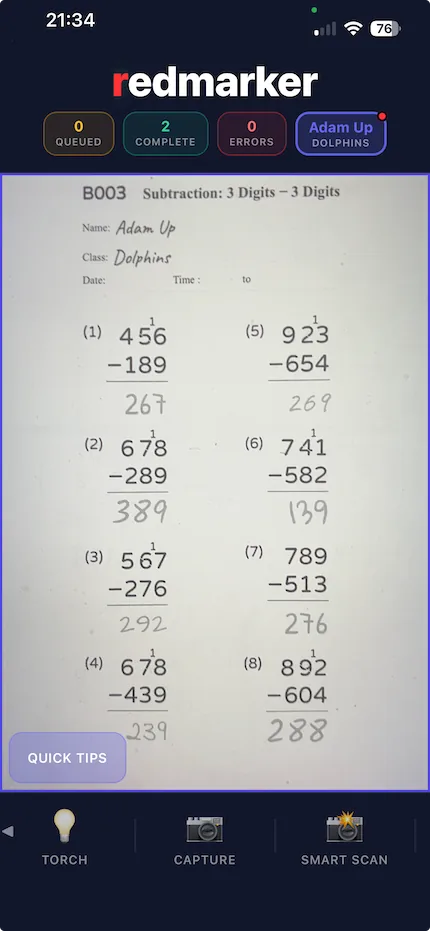
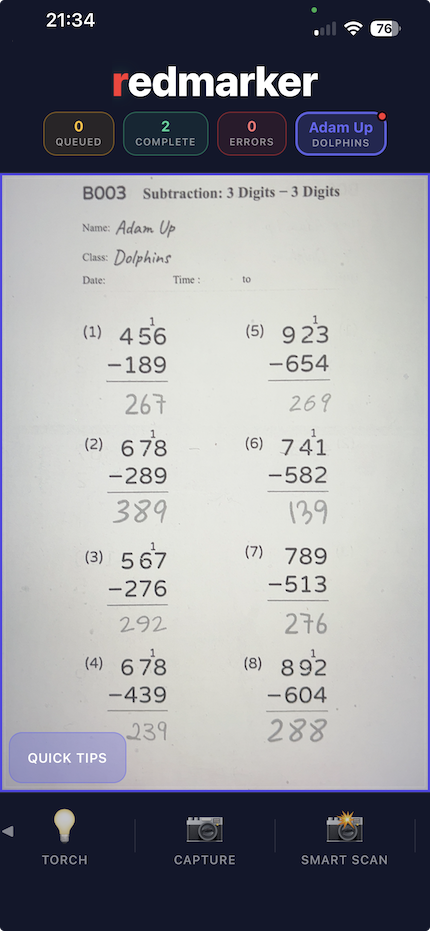
REDMARKER app camera view showing how to point and capture a worksheet
01

Capture Worksheet

Point your camera at a maths worksheet. The app shows a capture box overlay. Tap to capture or use Smart Scan to capture multiple worksheets quickly.
  • Manual capture with torch control and auto-cropping
  • Smart Scan captures multiple worksheets in sequence
  • Student information from the first worksheet automatically applies to subsequent worksheets. Tap to clear.
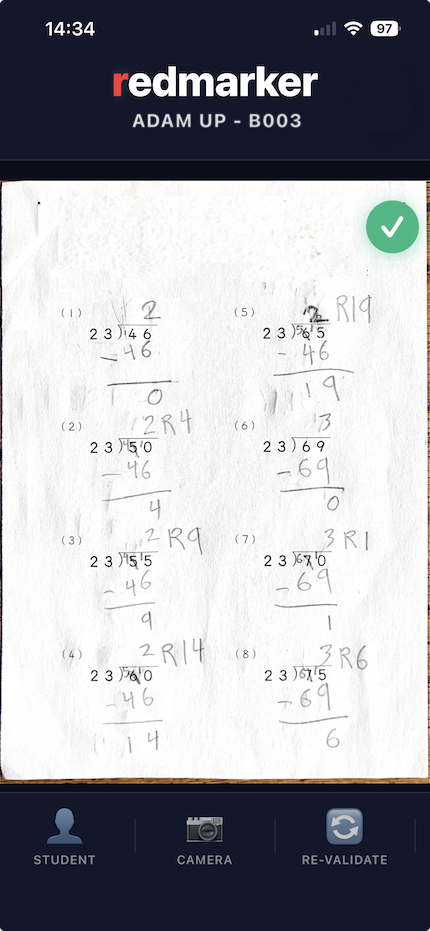
REDMARKER app showing worksheet processing with AI analysis
02

AI Processing

REDMARKER uses GPT-4o Vision to read the worksheet, identify each problem, extract expressions and answers, then validate them automatically.

  • Parallel processing background queue
  • Real-time status updates
  • Handles messy handwriting
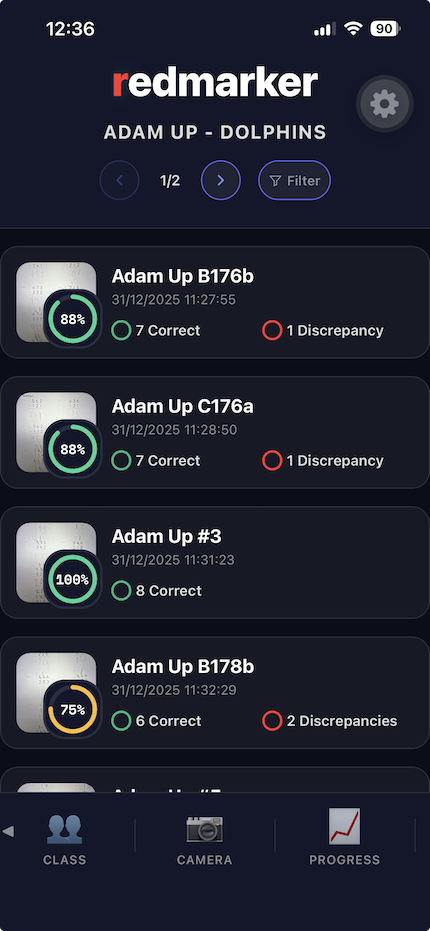
REDMARKER app showing worksheets automatically organised by student and class
03

Automatic Organisation

Worksheets are automatically organised by student name and class. Navigate folders to find specific worksheets.

  • Student name detection, either hand written or printed
  • Class identification, either hand written or printed
  • Hierarchical folder structure
  • Limit the number of cards visible on each page using the pagination controls in the header
    1/3
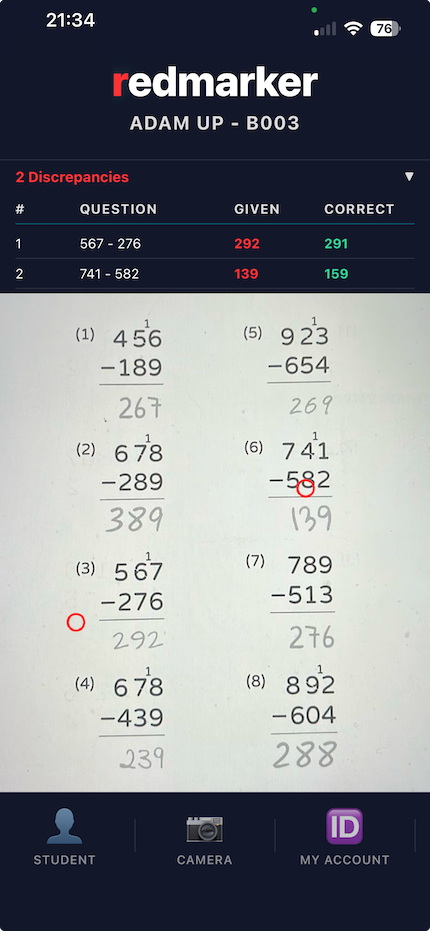
REDMARKER app showing worksheet with incorrect answers highlighted in red
04

Visual Feedback

View the worksheet with discrepancies highlighted. Pinch to zoom and pan. See an overlay table of all incorrect problems.

  • Pinch-to-zoom and pan gestures
  • Red markers on suspected incorrect answers
  • Collapsible discrepancies table
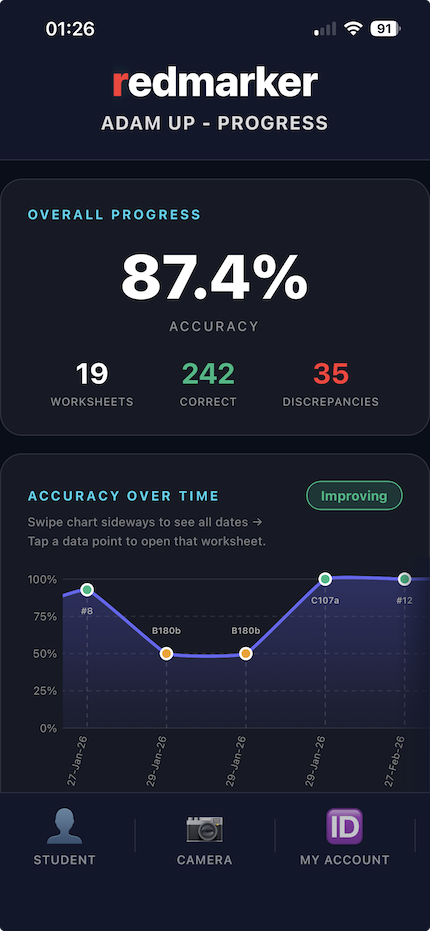
REDMARKER app showing student progress tracking with visual charts
05

Track Progress

View detailed progress charts showing accuracy over time. See statistics, trends, and identify students who need extra help.

  • Visual accuracy charts
  • Trend indicators (improving/declining)
  • Best and worst performance highlights
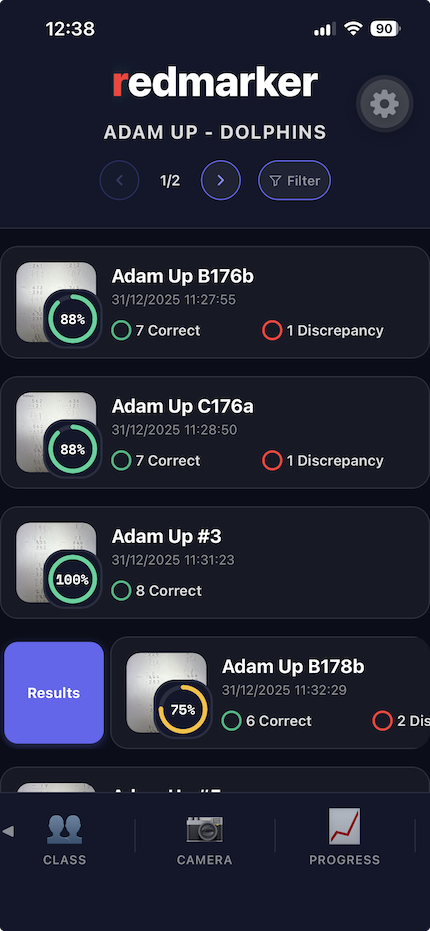
REDMARKER app showing swipe action to reveal results button
06

Accessing Results

Manually correct results when the app misreads handwriting.

  • Swipe right on the worksheet to reveal the Results button
REDMARKER app showing how to delete a single worksheet with swipe gesture
07

Deleting Single Worksheets

To delete a worksheet, swipe left on the worksheet then click Delete.

  • Swipe left on the worksheet to reveal the Delete button
  • A confirmation dialog will appear asking you to confirm the deletion.
REDMARKER app showing detailed results view with problem list
08

View Results

Select the result you want to update

  • Sort the problems by rows or columns to suit worksheet ordering
REDMARKER app showing modal dialog for editing OCR results
09

Editing Results

Select and edit the expression or student's answer. The app recalculates automatically.

  • Edit expression or answer in the modal dialog
  • The app recalculates results automatically
  • Confidence scores show the AI's confidence in each result
REDMARKER app showing bulk selection mode for moving or deleting multiple worksheets
10

Moving or Deleting - Step 1

Worksheets without student information are placed in "Unidentified Students". Move them to existing student or class folders.

  • Long-press the worksheet you want to move or delete.
  • Checkboxes will appear next to all worksheets and a menu will appear with the options to move, delete or cancel.
REDMARKER app showing folder selection dialog for moving worksheets
11

Moving or Deleting - Step 2

When moving a worksheet.

  • A modal shows all student and class folders.
  • Tap a folder to move the selected worksheets.
REDMARKER app showing filter dialog for filtering worksheets by student, class, or date
12

Filtering

Filter by student, class, or date range. Click the filter button in the header.

  • A modal shows filter options and the option to clear filters.
  • Filters apply in real-time as you type.
  • When a filter exists, the filter icon will be highlighted in the header.
REDMARKER app showing subscription tier, usage statistics, and remaining credits
13

Subscription and Usage

View account status, subscription tier, remaining credits, and usage statistics.

  • Shows user's subscription tier
  • Unique identifying token (should you need to contact support)
  • Shows remaining credit
  • Usage summary
REDMARKER app settings screen showing configuration options
14

Settings

Access settings from any screen via the Settings button.

  • Export or import previously captured worksheets.
  • Changes made in settings are applied immediately.
  • Language support for 18 different languages.

What Our Users Say

Feedback from actual users

★★★★★

"REDMARKER has completely transformed our evening routine. I've become so reliant on this tool."

👨‍👩‍👧‍👦
Nadia Carter
Daily User
★★★★★

"As a teacher, I love how REDMARKER automatically organises worksheets by student. The progress tracking helps me identify which students need extra support, and I can spend more time teaching instead of grading."

👩‍🏫
Elementary Teacher
Classroom Use
★★★★★

"The AI is incredibly accurate, even with messy handwriting. The manual correction feature is perfect for those rare times when the app misreads something. This app is a game-changer for homework checking, and has already saved me tonnes of time."

👨‍💼
Tutor
Professional Use

Frequently Asked Questions

Everything you need to know about REDMARKER

REDMARKER uses GPT-4o Vision, one of the most advanced AI models available. It accurately reads both handwritten and printed math problems with high precision. The app also includes a manual correction feature, so you can easily fix any rare errors if the app misreads handwriting.

Your photos are processed securely and are never stored on our servers. Images are temporarily sent to OpenAI's GPT-4o API for validation purposes only, then immediately deleted after processing. OpenAI does not use your images to train their models, and all data is handled according to their privacy policy. All worksheet data and images are stored locally on your device only. We take your privacy seriously and only share images with OpenAI's API as necessary for the validation of maths worksheets.

REDMARKER requires an internet connection to process worksheets using AI. However, once worksheets are processed, you can view results, track progress, and organise worksheets offline. The app also includes a background processing queue, so worksheets captured while offline will be processed automatically when you reconnect to the internet.

REDMARKER works on iOS 13.0 or later and Android 8.0 (API level 26) or later. The app is optimised for modern devices and takes advantage of the latest mobile technologies for the best performance and accuracy.

Yes! REDMARKER includes data export functionality. You can export your worksheets, progress data, and student information. Use the export feature in the app to share your data or create backups. All your data is stored locally on your device, so you have full control.

Credit top-ups are available when you exceed your monthly subscription limit. You can purchase credit packages (100, 250, or 600 worksheets) that are used automatically when you need them. Credits never expire, so you can use them whenever you need extra worksheets. This gives you flexibility without requiring a subscription upgrade. View credit packages →

REDMARKER offers a free tier with 10 worksheets per month, perfect for trying out the app. For regular use, Premium plans start at $9.99 per month for 200 worksheets, or $99.99 per year with 17% savings. If you need more worksheets, you can purchase credit top-ups (100, 250, or 600 worksheets) that never expire. View all pricing options →

No, you don't need to pay extra for future upgrades. All app updates, new features, and improvements are included with your subscription at no additional cost. Whether you're on the free tier or a Premium plan, you'll automatically receive all updates and new features as they're released. We're constantly improving REDMARKER based on user feedback, and these enhancements are always included in your plan.

Yes, we provide support for all users. If you encounter any technical issues or have questions, you can contact our support team directly through the app's Settings screen. We aim to respond to all support requests promptly and help resolve any issues you may experience. Your feedback is valuable to us, and we're committed to ensuring REDMARKER works smoothly for all users.

Yes, we're continuously working to expand worksheet format support. Currently, REDMARKER works excellently with Kumon and Twinkl worksheets, as well as various custom worksheet layouts including 2-column lists, bordered tables, and grid formats. We're actively developing support for additional formats and welcome suggestions from users. All format updates are included with your subscription at no extra cost.

Perfect For

👨‍👩‍👧‍👦

Parents

Check homework quickly and spend more time helping your kids learn

👩‍🏫

Teachers

Mark worksheets faster and track student progress effortlessly

📚

Tutors

Monitor improvement over time and identify areas needing practice

🏠

Homeschool Families

Organise and track multiple students' work in one place

Simple, Transparent Pricing

Start free with 10 worksheets/month, or upgrade to Premium for 200 worksheets/month

Free
$0 /month

10 worksheets per month

All core features included

Need More?
Top-Up

Credit packages available

Purchase credits when you exceed your limit

View Credit Packages

All plans include the same powerful features. Upgrade anytime or purchase credit top-ups when you exceed your monthly limit. See full pricing details →

Your Privacy & Security

We take your data privacy seriously

🔒

Data Privacy

All worksheet images and student data are stored locally on your device. We never store your images or personal information on our servers. Your data stays in your control.

🛡️

Secure Image Processing

Images are processed securely through encrypted connections and immediately deleted after processing. We use industry-standard encryption to protect your data in transit.

GDPR Compliant

We comply with GDPR and other data protection regulations. You have full control over your data with export and deletion features. View our Privacy Policy →

Your data, your control. All worksheet images and student information are stored exclusively on your device. We only store minimal metadata (subscription tier, usage counts) associated with an anonymous token, never personal information.

Ready to Save Hours Every Week?

Download REDMARKER today and transform how you check homework

Available now on iOS and Android